Automations

The workflows behind the funnels.

A pretty page only works if someone follows up. These short walkthroughs show the GoHighLevel workflows I build so leads get answered, nurtured and booked automatically.

010:46 walkthrough

Missed-Call Rapid Response

Every missed call gets an instant text-back. The lead replies 1, 2 or 3 and the workflow branches into booking, urgent help or a scheduled call-back — so no lead goes cold.

  1. 1Missed call trigger
  2. 2Instant SMS text-back
  3. 3Reply-based branching
  4. 4Wait & follow-up timers
020:43 walkthrough

Attorney Payment-Confirmed Sequence

Once a client pays, the right emails, SMS and internal alerts fire for each service type, and contracts and documents are sent automatically for signature.

  1. 1Payment trigger
  2. 2Email + SMS per service
  3. 3Team notifications
  4. 4Documents & contracts sent
033:20 walkthrough

Full Job Pipeline Automation

A complete walkthrough of a service business account: workflows organised by stage — new leads, qualification, nurture, job completed, reviews and lost-lead recovery — synced with an outside job-management tool.

  1. 1New lead intake
  2. 2Qualification & nurture
  3. 3Job completed → review request
  4. 4Lost-lead win-back

More workflows

Calls, bookings, events, routing and social.

040:44 walkthrough

IVR Phone Menu

Callers hear a welcome message and pick from a menu: press 1 for services, 2 to leave a recorded message, or 3 to reach a live team member. No answer? The menu replays so no caller is lost.

  1. 1Inbound call trigger
  2. 2Welcome message & caller input
  3. 3Press 1 / 2 / 3 branches
  4. 4Transfer or record message
050:16 walkthrough

Call Booked → SMS Confirmations & Presell

The moment a call is booked, the lead gets SMS confirmations and a presell sequence that warms them up before the call, with separate paths for show-ups and no-shows.

  1. 1Call booked trigger
  2. 2SMS confirmation
  3. 3Presell message sequence
  4. 4Show / no-show branches
060:17 walkthrough

Appointment Confirmation + Reminders

Every booking gets an instant confirmation, then email and SMS reminders 24 hours, 1 hour and 5 minutes before the appointment to cut no-shows.

  1. 1Appointment trigger
  2. 2Confirmation email
  3. 324-hour & 1-hour reminders
  4. 45-minute email + SMS
070:20 walkthrough

Membership Sales Pipeline

A CRM pipeline that tracks every member from trial to paid plan, with dedicated win-back stages for cancelled trials and memberships.

  1. 1Trial stage
  2. 2Paid plan stages
  3. 3Trial-cancelled win-back
  4. 4Membership-cancelled win-back
080:44 walkthrough

Event Registration & Reminder Countdown

Registrants are tagged and the team is notified, then the workflow branches on the date they picked and sends a confirmation plus reminder emails 7, 3, 2 and 1 day before.

  1. 1Form submission trigger
  2. 2Tag + team notification
  3. 3Branch by chosen date
  4. 47 / 3 / 2 / 1-day reminders
090:40 walkthrough

Lead Routing by Location

Funnel leads are checked against their answers and ZIP code, then tagged, assigned to the right team member and announced with an internal notification.

  1. 1Funnel form trigger
  2. 2Answer-based conditions
  3. 3ZIP-code routing
  4. 4Assign user + notify team
100:20 walkthrough

Instagram Comment-to-DM

Someone comments on an Instagram post; the workflow replies, sends an interactive DM, waits for their answer, then updates the contact and emails the team.

  1. 1Instagram comment trigger
  2. 2Auto-reply & interactive DM
  3. 3Wait for reply
  4. 4Update contact + email alert
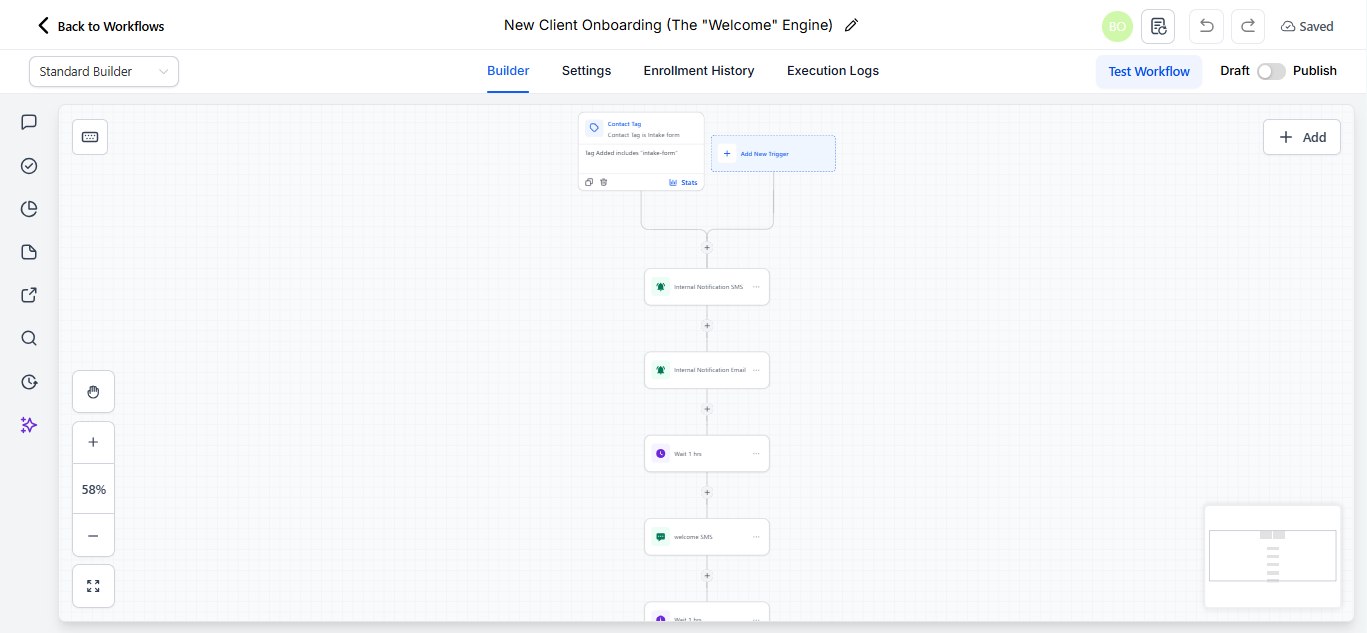
New Client Onboarding — the “Welcome” Engine workflow
11Workflow screenshot

New Client Onboarding — the “Welcome” Engine

When a new client submits the intake form, the team gets an SMS and email alert, then the client receives a timed welcome sequence.

  1. 1Intake-form tag trigger
  2. 2Internal SMS + email alert
  3. 3Wait 1 hour
  4. 4Welcome SMS sequence

More automation samples

Browse the full folder of workflow recordings and screenshots.

Open the folder

Ready when you are

Let's turn your GoHighLevel account into a client machine.

Tell me what you need — a funnel, a website, or the automations behind it — and I'll map out the build.